A janky ListView is usually not Flutter's fault.
I've debugged this on four production apps now, and it comes down to the same handful of things every time.
The last one was a wholesale app with a few hundred products. The category screen scrolled fine on my phone and fell apart on a cheap Android. The team had already added const everywhere and moved from Provider to Bloc. Neither helped, because neither was the problem.
Here's what it usually turns out to be.
1. Real work inside build()
Date formatting, filtering, sorting. build() gets called a lot, sometimes on every frame while you scroll, so that work runs again and again for nothing. Do it once and hold onto the result.
2. Full-size images in small tiles
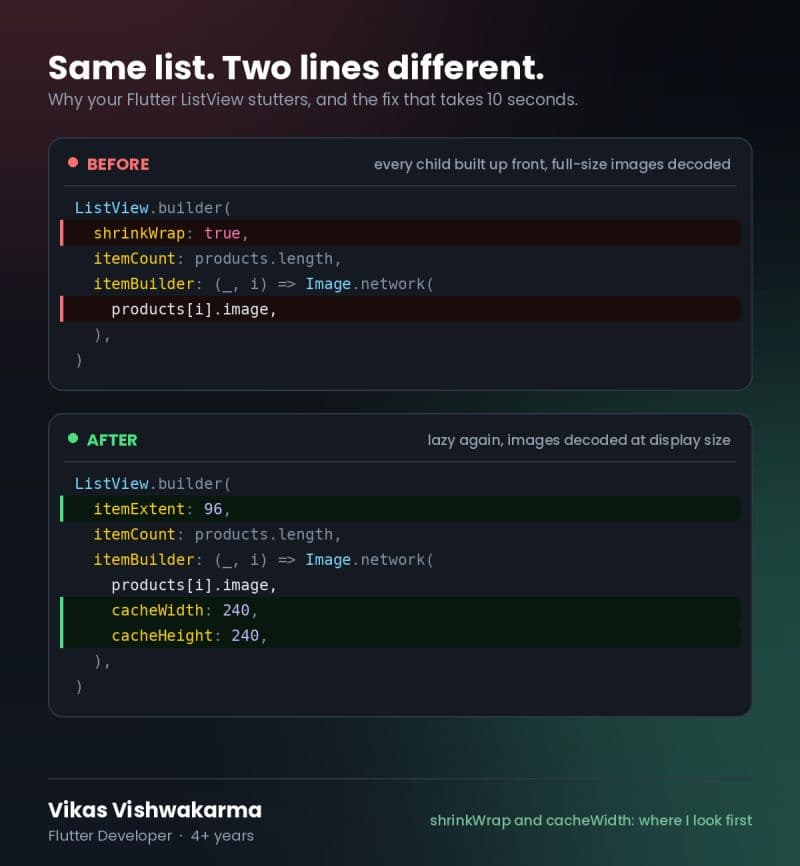
This was the one in the wholesale app. Sellers were uploading product photos straight from their phones, so the app was pulling down full camera resolution images and painting them into a small grid tile. Flutter still decodes the whole thing into memory. cacheWidth and cacheHeight fixed it in one line, and the stutter on the cheap device went away.
3. State sitting too high up
One item changes and the whole list rebuilds. Move that state down into the row widget so only the row that changed rebuilds.
4. shrinkWrap: true inside another scrollable
Most people add this to make a layout error go away. It works, but it also builds every child immediately, so lazy loading is gone. On a long list, that's every widget built before anything appears on screen.
5. No itemExtent
If your rows are a fixed height, set itemExtent or prototypeItem. Flutter stops measuring every child, and long lists feel noticeably better.
One more: profile in profile mode
Profile in profile mode, not debug. Debug is slow on purpose. I lost most of an afternoon once chasing a problem that didn't exist in a release build.
const and RepaintBoundary are worth using, but they won't rescue you if one of the five above is the actual bottleneck. Measure before you change anything.
Got a Flutter app that stutters or crashes on real devices? Tell us about it.